Add a Model
Add an inference provider to your workspace. An inference provider is the AI model service that your agents use, such as OpenAI or Anthropic. You add it first because the sandbox in the next step picks its models from your providers.
What You Need
- A Ready workspace from Create a workspace.
- An API key from a model provider.
Add the Inference Provider
- In the workspace sidebar, open Workspace settings → Inference → Inference providers. The page Inference providers opens.
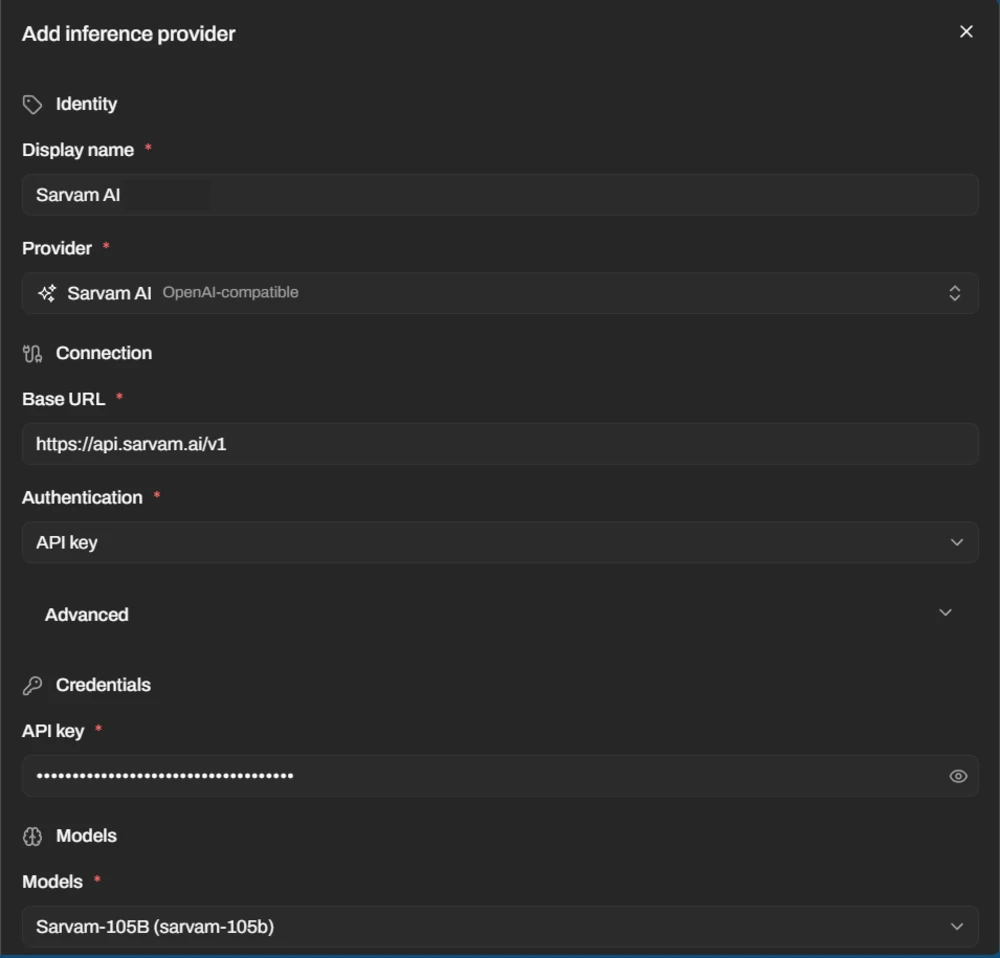
- Select Add inference provider. The sheet Add inference provider opens.
- Enter a Display name, for example
Production OpenAI. - Open the Provider list and choose your provider. Use the Search providers... box to find it. Fill in any field under Connection that the provider asks for. The fields differ by provider. See the table in Inference providers.
- Paste your key in the API key field under Credentials. AgentZ does not pass this key to the agent.
- In the Models field, choose at least one model. If your model is not in the list, type its model ID. This is the name your provider gives the model.
- Select Add provider.
The new provider appears in the table on the Inference providers page.
Tip
No API key? Choose OpenAI Codex as the provider and select Connect. A new tab opens. Enter the one-time code there and sign in with your ChatGPT subscription. For a model on your own server, choose OpenAI-compatible or Anthropic-compatible. See Inference providers.
Check It Worked
- Wait a few seconds. The Status column of your provider shows Accepted first, then Ready.
- The Models column shows the number of models you chose.
If It Does Not Work
- The message Model catalog unavailable appears. The model list did not load. Type the model ID in the Models field.
- The sheet shows Display name is required. Enter a Display name.