Connecting Integrations
Connect the tools and data an agent is allowed to reach, over MCP.
How MCP connectors work
MCP is the Model Context Protocol. A connector exposes a provider's tools to an agent, and AgentZ governs every call through one policy edge rather than per agent.
Adding a connector
Pick a provider, authorize once, and wait for it to go Ready.
The OAuth flow
Coming soon
This section will cover the click path, end to end.
Callback URL
Coming soon
This section will cover what you register with the provider.
Scopes
Coming soon
This section will cover how you choose the narrowest set that works.
Tool permissions
Permission is set for each individual tool call, not for the connector as a whole. Read and scan can pass while mutate, push and delete stay denied, so a prompt injection cannot turn a lookup into a teardown.
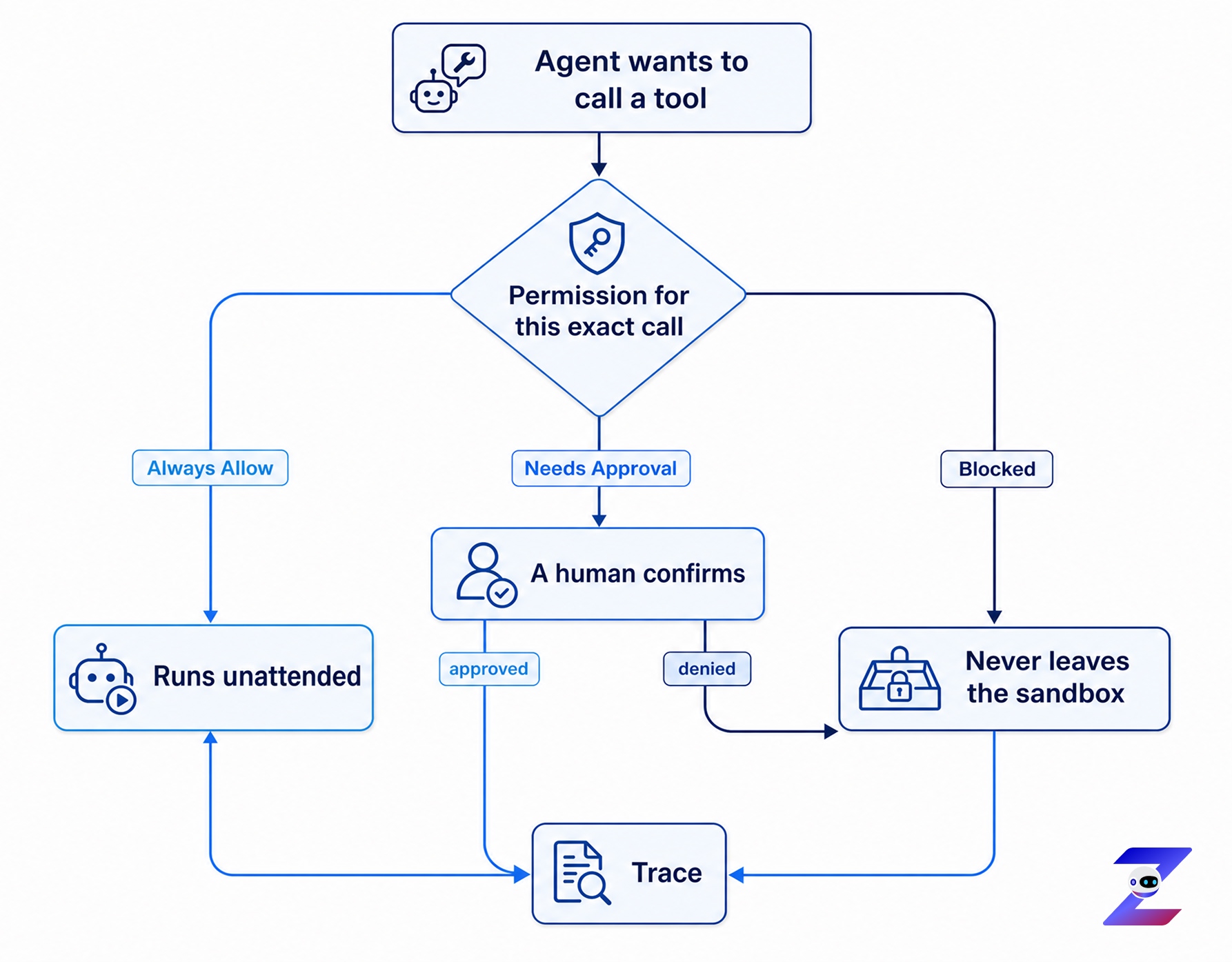
Every branch ends in the trace, including the blocked one. A denied call is evidence, not a silent no-op.
Blocked
The call never leaves the sandbox.
Needs Approval
A human confirms before the call runs. Most teams want this for anything that writes.
Always Allow
The call runs unattended, and lands in the trace.
Credential matching and host-based auto-detection
Coming soon
This section will cover how AgentZ picks the right credential for an outbound host.
Troubleshooting common connector errors
Coming soon
This section will cover the errors teams actually hit, and the fix for each one.