Workflows
A workflow is a saved graph of steps that belongs to one agent. You ask the agent to create it in chat. Workflows exist only in General purpose workspaces.
In a graph, each step is a node and each arrow between steps is an edge.
Ask the Agent to Create the Workflow
The web app has no workflow editor. Send a chat message that asks for a workflow and describes the job. The agent follows a built-in skill before it saves anything.
- It runs the task by hand once.
- It moves reusable logic into a skill or a script when the logic is not trivial.
- It saves the graph.
If the workflow name already exists, the agent reports the conflict. It does not rename the workflow.
A Node Holds One Step
Each node is one step with a unique name. A node holds these fields.
| Field | What it holds |
|---|---|
| Goal | What the step must achieve |
| Instructions | What the agent does in the step |
| Done criteria | How the agent knows the step is finished |
| Preferred skills | Skills the agent loads before the step (optional) |
| Preferred tools | Tools the agent favors in the step (optional) |
Edges Connect the Nodes and Carry Branch Labels
An edge is one allowed move from one node to the next. The graph has no loops. It has at least one start node and one end node.
A node with several outgoing edges needs a branch label and a condition summary on every edge. The label names the outcome, for example reproduced or needs-info.
Inputs Are Typed Values or One JSON Payload
A workflow declares one input contract, either typed inputs or arbitrary JSON.
- Typed inputs: a flat list of named values. Each value is a
string, aninteger, anumberor aboolean. - Arbitrary JSON: one free-form JSON payload with a description and a default payload that prefills the form.
Schedules and webhooks check their values against this contract. A workflow with no parameters has no inputs.
The Graph Viewer Is Read-Only
- Select Workflows in the workspace sidebar.
- Pick an agent in Agent and a workflow in Workflow. The Graph tab shows the nodes and edges.
- Click a node. A panel shows its goal, Instructions, Done criteria, preferred skills and preferred tools.
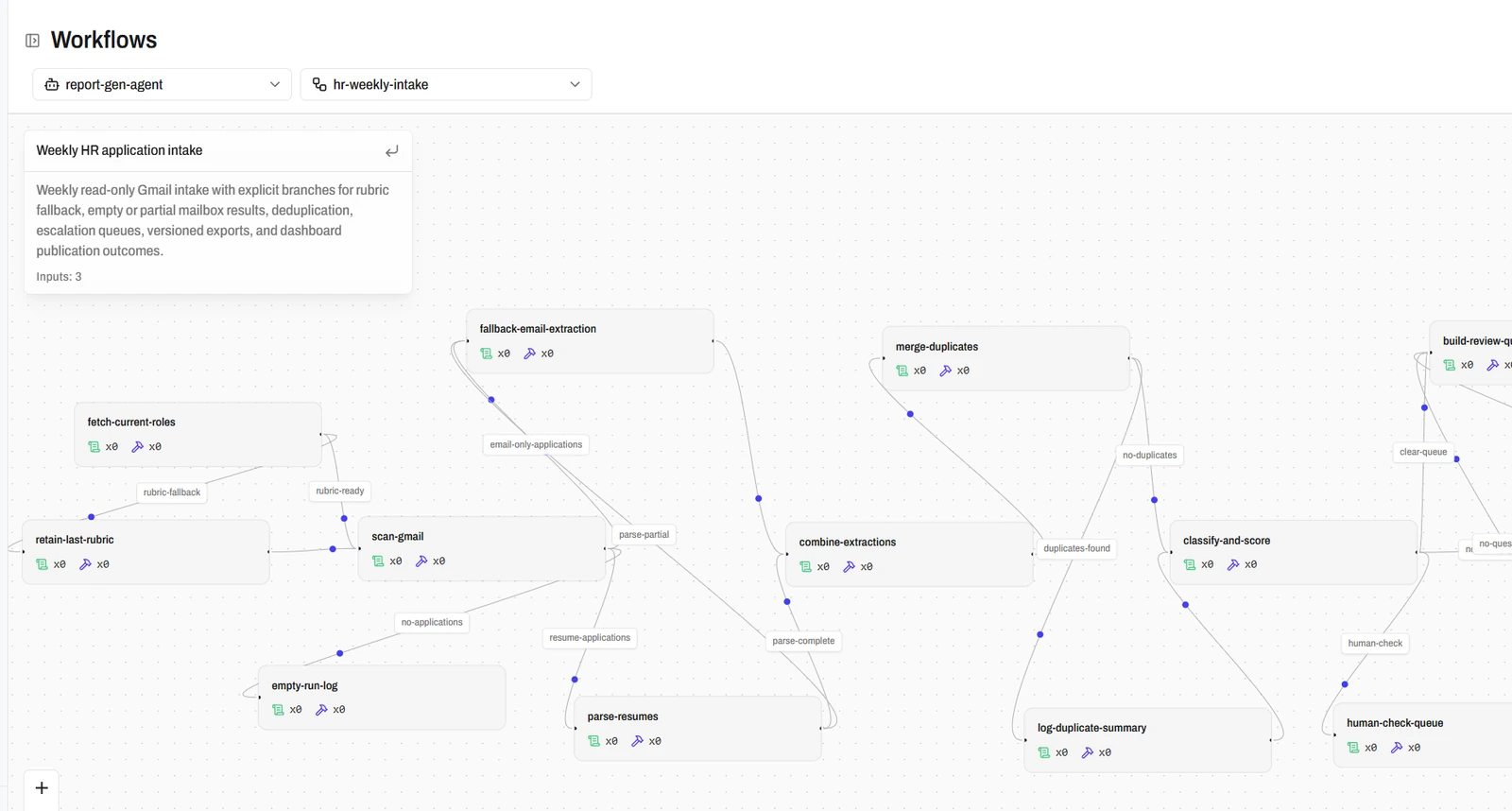
You can drag nodes to tidy the layout. You cannot edit the graph. To change a workflow, ask the agent in chat to delete it and create it again.
The Model Follows the Graph
Each run starts a new session on the agent. The model of the agent reads the graph and carries out the nodes. For each node it reports Running, then Succeeded or Failed.
The agent does not ask you questions during a run. A workflow has no outputs field. The run keeps a status message, and the session keeps the transcript.
Warning
A run has no chat, so AgentZ allows tools marked consent required without a prompt. See Sandboxes.
Runs Move Through Five States and Obey a Time Limit
| State | Meaning |
|---|---|
| Pending | The run exists and has not started. |
| Running | The agent works through the nodes. |
| Succeeded | The agent reported success. |
| Failed | The agent reported a failure. |
| Unacked | The session ended before the agent set a final status. |
Each run has a timeout from 1 to 604,800 seconds (7 days). Schedules and webhooks default to 3,600 seconds. A run that exceeds its timeout records the reason TimedOut.
Next Step
Continue with Schedules.